Boosted posts are ads you create from posts on your Facebook Page. Boosting a post may help you get more people to react, share, and comment on it, and they can also help you to send people to a landing page.
Before creating an ad using an existing post, make sure that the post you want to use has a link in the description. Our Auto Posting Tool includes a link in the post, so you can use these posts to create ads. Read more about our Auto Posting Tool here.
Follow the steps below to create Facebook Ads with existing posts:
1. Go to your Facebook Page and find the post you want to boost.
2. Click the ‘Boost Post’ button. You can find it in the bottom-right corner of your post.

3. Select the Goal that meets your needs. We recommend you to select the ‘Get more website visitors’ option.
4. Add a call-to-action button (Optional).
5. Select the Special Ad Category-Housing.

6. Create a targeting audience (optional).
7. Select the Duration and Budget of the boost post
8. Click ‘Boost Post Now’

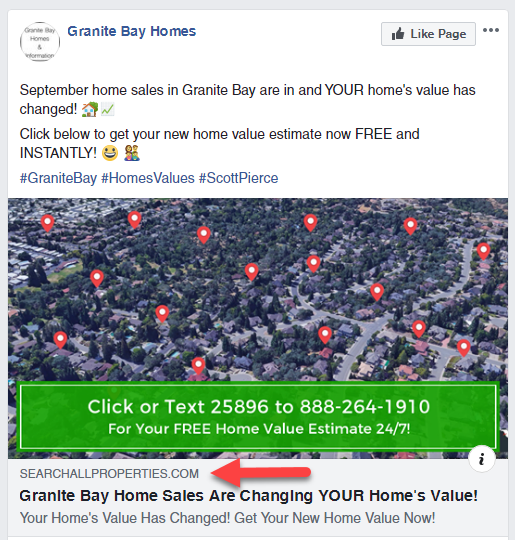
NOTE: A post with a link should look like any of the examples below: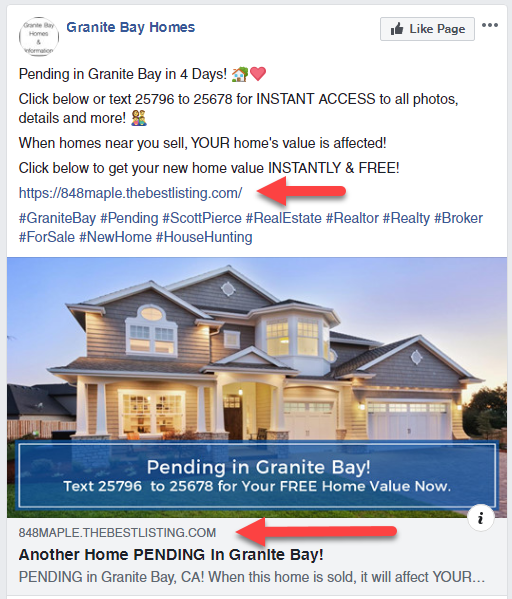
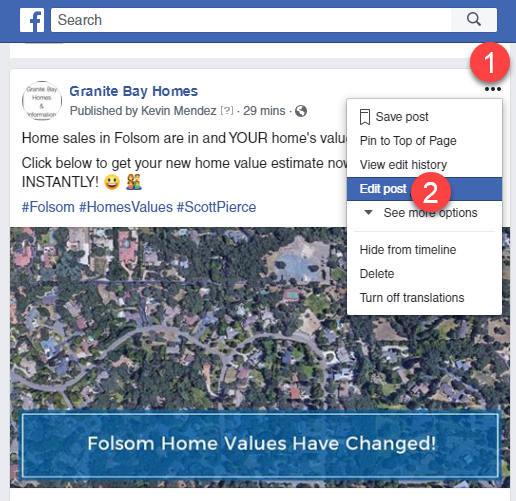
If you would like to edit a post to include a link in the description, do it by following these steps:
-Click the 3 dots on the top-right side of the post and click edit.
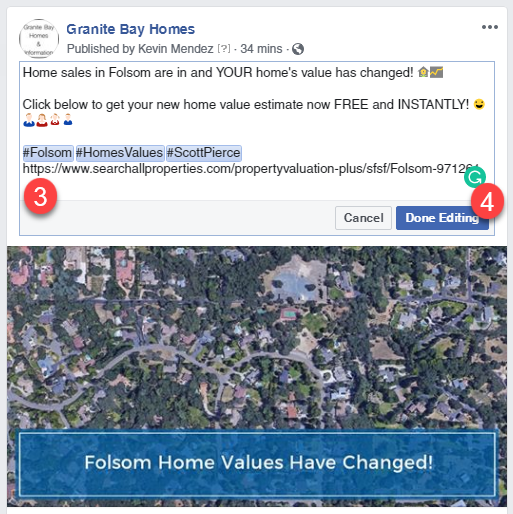
-Add the link and click ‘Done editing’.