
🎯 What is the difference between Regular and Messenger ads?
Both ad types allow you to capture buyer and seller leads by using L2L BOTs instead of landing pages. The only difference is how leads trigger the BOT on Facebook:
🔴 Facebook Regular Ads using BOTs: To enable this option, you have to copy the BOT link within L2L.

Then, you need to paste the BOT link in the Website URL field and finish the Facebook ad, as usual, following this support post.
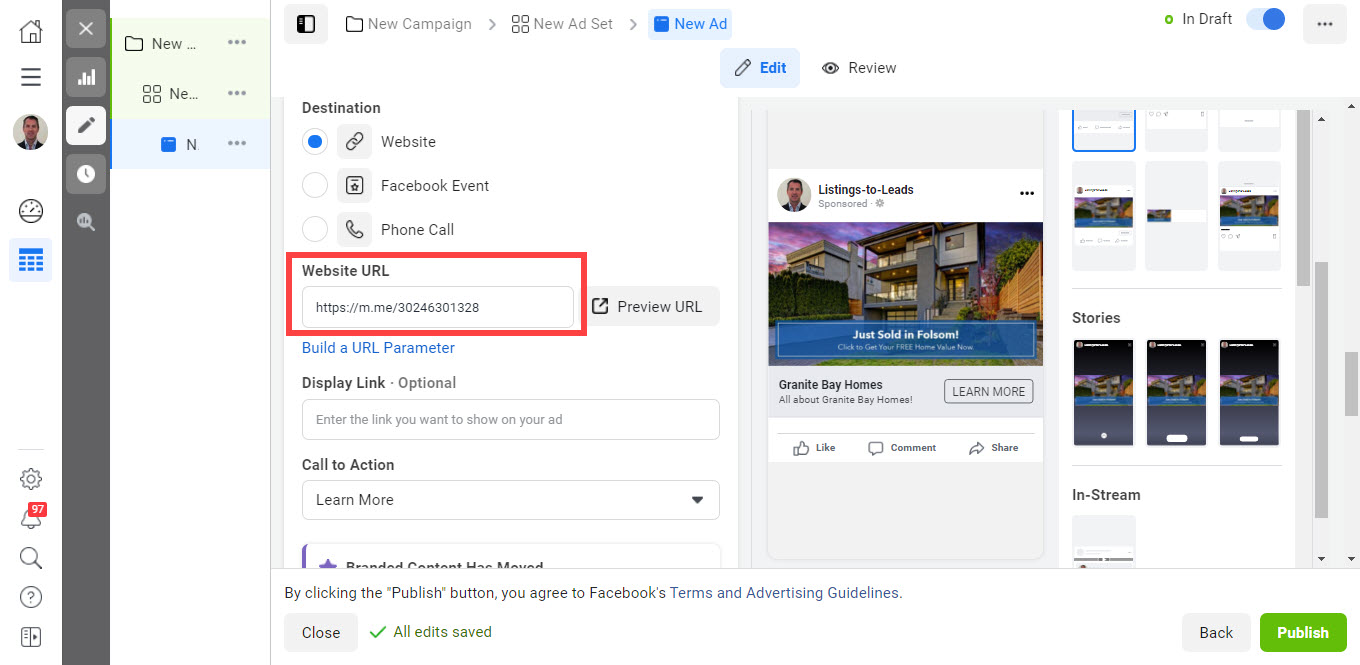
Once the ad is published, people will be redirected to the BOT as soon as they click the ad and the BOT will capture leads by asking a few questions.
🔴 Facebook Messenger Ads using BOTs: To use this option, you need to create a Facebook Messenger ad following this support post and add the correct ‘Payload’ to trigger the BOT you want to use to collect leads within Facebook Messenger.
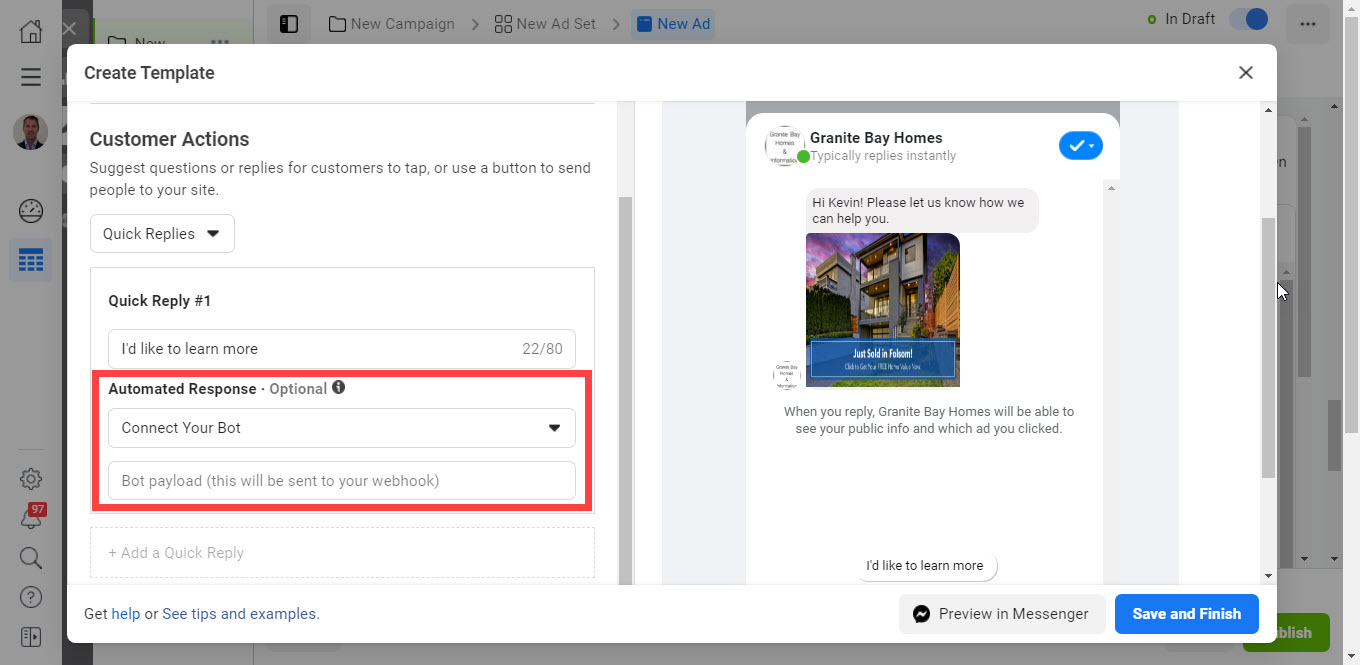
Then, you need to finish the Facebook Messenger ad as usual. The BOT will collect leads when people click the ad and answer a few questions.
Learn how to create Messenger Ads using the Listing BOT here.
Learn how to create Messenger Ads using the Home Valuation BOT here.
🎯 What are the ‘Payloads’ I can use when creating Facebook Messenger Ads using BOTs?
When creating Messenger ads using L2L BOTs, you need to add a payload in the ‘Create Chat: Start Conversations’ section so the correct L2L BOT conversation is triggered as soon as people click an ad. Here are the payloads you can use to either trigger a Listing BOT, Home Valuation BOT, Buyer BOT or Seller BOT:
- Listing to trigger the BOT conversation to provide details of a specific listing to leads
- Valuation to trigger the BOT conversation to provide Instant Home Valuations to leads
- Buyer to trigger the BOT conversation to help leads find their dream home
- Seller to trigger the BOT conversation help leads seller a home
Learn how to create Messenger Ads using the Listing BOT here.
Learn how to create Messenger Ads using the Home Valuation BOT here.
🎯 How many BOTs can I create per L2L account?
You can create as many BOTs are you like, but remember that you can only have 1 BOT per Facebook page.
🎯 Why can’t I select my Facebook page when creating a new BOT?
If you only have one Facebook page and you already created a Bot, then, your page will be grayed out because you can create one BOT per Facebook page. If that is the case, you will need to either change the BOT type or delete the current Bot to be able to create a different Bot.
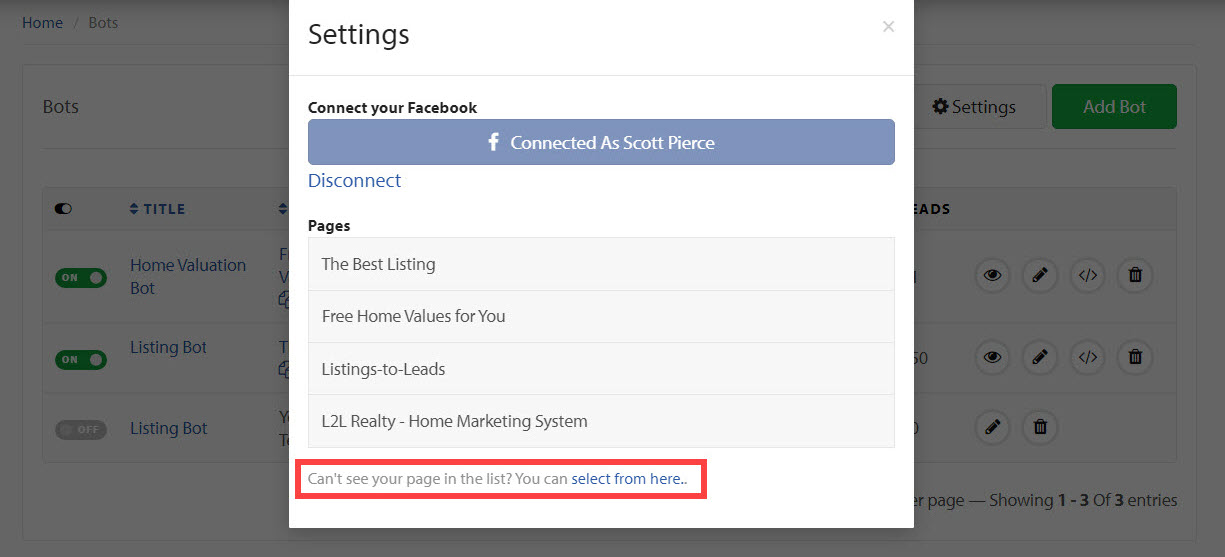
However, if you have more than one Facebook page and you cannot see the page you want to use, then go to the Bots tab and click the ‘Settings’ button. Then, click the link “Can't see your page in the list? You can select from here.” at the bottom of the popup, and follow the steps to add more pages. Once this is done, you will be able to see all your Facebook pages, and you will be able to create more bots if needed.
🎯 Are the Leads I collect via Messenger sent to my L2L account?
Yes, they are. Currently, only complete leads are sent to your L2L account. Partial leads will be sent to your L2L account soon.